QuickDrag for Chrome: Enhance Drag-and-Drop Mouse Gestures
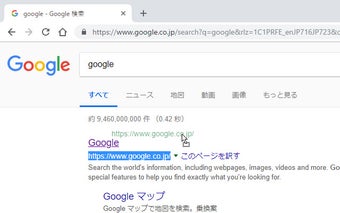
QuickDrag for Chrome is a free add-on that extends the functionality of drag-and-drop mouse gestures. With this tool, users can perform a web search of selected URLs or texts, as well as save images on a webpage.
To use QuickDrag, simply select the desired text or URL and drag-and-drop it. The add-on will open a new tab and perform a search using the selected string. Additionally, users can also open links in new tabs by dragging and dropping them.
One useful feature of QuickDrag is the ability to save images by dragging them. This makes it convenient for users to quickly save images they come across while browsing.
QuickDrag offers customizable settings, allowing users to choose their preferred search engine and adjust tab opening preferences.
Please note that QuickDrag cannot be used on pages where extension usage is restricted, such as the Chrome Web Store.
Disclaimer: While the developer has taken great care in creating this extension, they do not guarantee its accuracy, currency, or safety. The developer reserves the right to make corrections, modifications, additions, interruptions, or deletions to the published information without prior notice. The developer is not responsible for any inconvenience or damages that may occur from using this extension.